
To use your Quokka Net service on Neoloop (formerly Lynham Networks) you need a router (also called a modem or gateway) that plugs into the Ethernet port on your Neoloop fibre box. You can buy one from us, or bring your own if it meets the requirements below.
Buy a router from us
Add a router when you sign up, or buy one from the hardware store in your account. We don’t always send routers set up for your service, so when it arrives, connect to its Wi-Fi (the name and password are on its label), or open its app, and its setup wizard starts. Choose the connection type in your activation email, and for PPPoE enter the username and password from the email too.
Bring your own router
Your router needs:
- a WAN Ethernet port
- to connect using PPPoE (a username and password) through that WAN port
It also mustn’t be locked to another provider. Routers supplied by other internet providers often are, so they may not work even if they meet the requirements.
You’ll need the PPPoE username and password from the activation email we send when your service is connected. If you can’t find them, contact us.
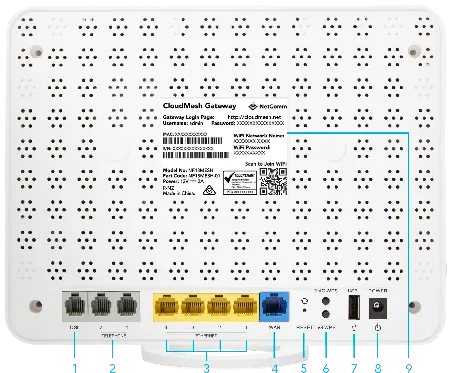
Example: on this NetComm NF18Mesh, the blue port labelled 4 is the WAN Ethernet port.
Your Neoloop fibre box is usually an Adtran or Ubiquiti model. What its lights mean is in Adtran ONT lights explained and Ubiquiti NTU lights explained.
Routers we know work
- NetComm NF18Mesh
- NetComm NF10WV (no longer sold)
- ASUS ZenWiFi AX Mini (XD4)
- TP-Link Archer AX10 (AX1500 Wi-Fi 6)
- TP-Link Archer VX1800v (AX1800 Wi-Fi 6 VDSL/ADSL modem router)
- TP-Link Archer AC2100 (VDSL/ADSL modem router)
- TP-Link Archer AC1200 (VDSL/ADSL modem router)
- MikroTik hAP ac2, hAP ax2, hAP ax3 and hAP ax lite LTE6
- MikroTik Chateau LTE 6, LTE 6 ax, LTE 12, LTE 18 ax and 5G ax
- MikroTik Audience
- MikroTik L009, RB1100, RB3011, RB4011 and RB5009 series
Setup guides for other routers, including eero, TP-Link Deco BE5000 and TP-Link Archer AX23, are in Setting up your router. When a guide asks for the connection type, choose PPPoE.
Routers that don’t work
- Optus Ultra Wi-Fi Gen 2
- TP-Link Deco M3W
Still not connecting?
Check the lights on your router and fibre box, then restart both. If it’s still not working, report a problem or call us on 1800 663 977. More about Neoloop plans is on our Neoloop page.