
Opticomm 25
25 Mbps
5 Mbps upload · 20 Mbps typical evening
$49/mo
Ongoing price. No promo expiry.
- Unlimited data
- $0 activation fee
- Opticomm fibre
- Shared public IP (CG-NAT)

Opticomm addresses only
Plans for Opticomm, Telstra Velocity, LBNco, OPENetworks and Pivit Networks estates. Up to 1,000 Mbps*, from $49/month, $0 activation and no lock-in contract.
* Not every Opticomm address can get every speed. Some Opticomm locations are limited to 50 or 100 Mbps, and the address checker shows the plans available at yours.

Australian-owned internet, built for Opticomm estates.
6 speed tiers, up to 1,000 Mbps where your address supports it. Some Opticomm locations top out at 50 or 100 Mbps.
Including Telstra Velocity, LBNco, OPENetworks and Pivit Networks.
Plans from $49/month with $0 activation. No introductory rate that jumps after six months.
Month-to-month. Change speed or leave without an exit fee.
Covers Opticomm, Telstra Velocity, LBNco, OPENetworks and Pivit Networks estates.
Not every Opticomm address can get every speed. Some Opticomm locations are limited to 50 or 100 Mbps, and the address checker shows the plans available at yours.
25 Mbps
5 Mbps upload · 20 Mbps typical evening
$49/mo
Ongoing price. No promo expiry.
50 Mbps
20 Mbps upload · 50 Mbps typical evening
$75/mo
Ongoing price. No promo expiry.
100 Mbps
20 Mbps upload · 100 Mbps typical evening
$79/mo
Ongoing price. No promo expiry.
500 Mbps
50 Mbps upload · 450 Mbps typical evening
$79/mo
Ongoing price. No promo expiry.
750 Mbps
50 Mbps upload · 700 Mbps typical evening
$89/mo
Ongoing price. No promo expiry.
1000 Mbps
50 Mbps upload · 900 Mbps typical evening
$95/mo
Ongoing price. No promo expiry.
Heads up: Additional charges may apply at new developments: $300 new development fee (Class 5 premises), $330 new connection charge (Class 2 without MATV), or $550 (Class 2 with MATV). We will always tell you before your order is submitted.
Opticomm is a privately owned fibre network, separate from the nbn. Developers choose it for new estates and apartment buildings, so the fibre runs all the way to your home.
It's a wholesale network: Opticomm builds and looks after the fibre, and you buy your internet from a retail provider. That means you get to choose who you're with, and we reckon a Quokk is a fine choice.
Unlike many providers, we're on nine networks, so if you move, there's a good chance we can come with you.
Four steps from "is my place on Opticomm?" to online.
The checker confirms your place is on Opticomm and which plans you can get.
All online, $0 activation and month-to-month. Add a router from us, or bring your own.
If your address needs a new development or new line fee from Opticomm, we'll tell you before we go ahead.
When your activation email arrives, connect your router to the Ethernet (GE) port on your Opticomm box.
The Opticomm box (an ONT, or optical network terminal) is usually mounted on a wall inside your home. The fibre from the street plugs into it, often a yellow cable with a green plug, and your router plugs into its Ethernet port. Some Nokia boxes have four Ethernet ports: use the one named in your activation email.
Opticomm getting connected guideMost routers work on Opticomm. Yours needs a WAN Ethernet port and must connect using IPoE (also called DHCP or Dynamic IP). Routers locked to another provider may not work.
Routers that work on OpticommBring your own, or grab one from us. Either way there's no rental fee and nothing is locked to Quokka Net.

Free
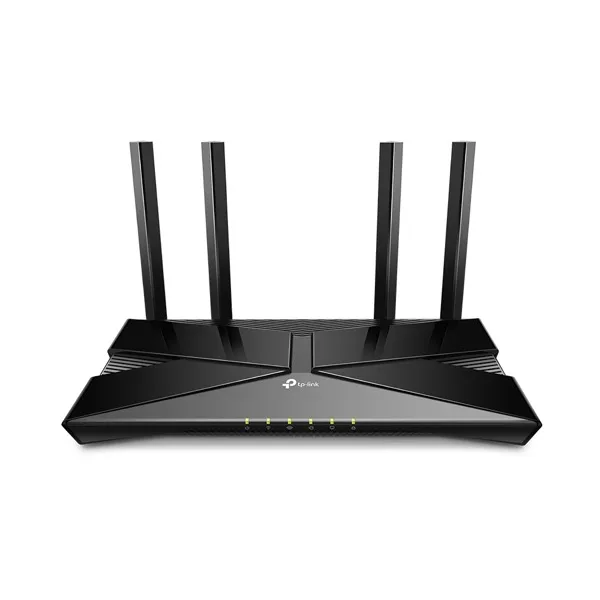
$149
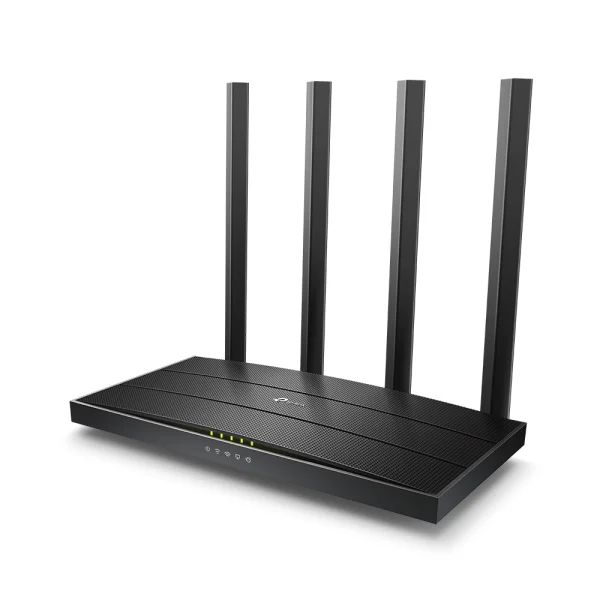
$99
No. Opticomm is a separate, privately owned fibre network built into new estates and apartment buildings. Like the nbn, it is a wholesale network: you buy your internet from a retail provider such as Quokka Net, not from Opticomm itself.
Yes. Opticomm is open to many retail providers, so you can choose the one that suits you. Check your address and we will confirm whether we can connect your place.
Use the address checker on this page. Many Opticomm estates are marketed under another name, including Telstra Velocity, LBNco, OPENetworks and Pivit Networks, so your developer may not have mentioned Opticomm at all.
No. The prices shown are our regular monthly prices for Opticomm plans, not introductory offers, so there is no discount period that ends and pushes your bill up.
Quokka Net charges $0 activation on Opticomm plans. Opticomm may charge a new development fee if you are the first connection in a newly developed area, or the first connection in an established area where the number of premises has increased: $300 for Class 5 premises, $330 for Class 2 premises without MATV, or $550 for Class 2 premises with MATV. If your address is classed as a subsequent install, there is a $299 new line fee. We will tell you about either fee before we go ahead.
No. Any router with a WAN Ethernet port that connects using IPoE (also called DHCP or Dynamic IP) will work. Plug it into the Ethernet (GE) port on your Opticomm box. Or add a router from us when you sign up: on Opticomm it connects by itself.
Not every Opticomm address can get every speed. Some Opticomm locations are limited to 50 or 100 Mbps, and the address checker shows the plans available at yours. Each plan lists its typical evening speed, which is the speed most customers can expect between 7pm and 11pm. Your actual speed also depends on your Wi-Fi, your devices and what you are connecting to.
Check for Opticomm outages and our service status, then try a few quick fixes at home. If it's still down, contact your provider: they raise the fault with the network for you.
No. Opticomm plans are month-to-month, so you can change speed or leave without an exit fee.
We'll help you through the whole move. Tell us your new address and move date, and we'll check what's available there and order a new service at your new place, ready for your move. If your new place is on a different network, you choose from the plans available there. If you're already with us, we'll close your old service once the new one is live, so you're not paying twice.
Totally normal. Opticomm runs fibre into new estates and apartment buildings, often under another name: Telstra Velocity, LBNco, OPENetworks and Pivit Networks estates are all on it. Pop your address into the checker and we'll tell you in about 20 seconds.
Not on Opticomm? No worries. We connect nbn and eight other networks, and our main address checker will show you every plan at your place.
Check your address is on Opticomm, pick a plan, and we'll take care of the rest.
Opticomm plans are available only at addresses served by the Opticomm network. Not every Opticomm address can get every speed. Some Opticomm locations are limited to 50 or 100 Mbps, and the address checker shows the plans available at yours.