
Vision 25
25 Mbps
5 Mbps upload · 23 Mbps typical evening
$38.99/mo
Ongoing price. No promo expiry.
- Unlimited data
- $0 activation fee
- Vision Network fibre
- Shared public IP (CG-NAT)

Vision Network addresses only
Up to 990 Mbps†, and up to 10x the speed of nbn.* Plans from $38.99/month, $0 activation and no lock-in contract.
† Not every Vision Network address can get every speed. The address checker shows the plans available at yours.

Fibre built into new estates and apartment buildings, and a lot quicker than you're used to.
The Vision Network runs up to ten times the speed of nbn.*
Vision runs fibre to greenfield estates and multi-dwelling units.
Month-to-month. Change speed or leave without an exit fee.
Fibre to greenfield estates and multi-dwelling units.
Not every Vision Network address can get every speed. The address checker shows the plans available at yours.
25 Mbps
5 Mbps upload · 23 Mbps typical evening
$38.99/mo
Ongoing price. No promo expiry.
50 Mbps
20 Mbps upload · 48 Mbps typical evening
$58.99/mo
Ongoing price. No promo expiry.
100 Mbps
40 Mbps upload · 98 Mbps typical evening
$65.99/mo
Ongoing price. No promo expiry.
250 Mbps
50 Mbps upload · 209 Mbps typical evening
$67.99/mo
Ongoing price. No promo expiry.
250-990 Mbps
20-50 Mbps upload · 509 Mbps typical evening
$68.99/mo
Ongoing price. No promo expiry.
Heads up: A new development fee may apply the first time a connection is ordered at a premises (mostly new builds). We will always tell you before your order is submitted.
The Vision Network is a privately owned network, separate from the nbn. Vision builds fibre into new housing estates and apartment buildings.
In some apartment buildings, Vision's fibre runs to the building and the last stretch uses the building's existing phone wiring, through a small Vision connection box (an NTU) in your apartment. It is a wholesale network, so you buy your internet from a retail provider like Quokka Net.
Unlike many providers, we're on nine networks, so if you move, there's a good chance we can come with you.
Four steps from "is my place on the Vision Network?" to online.
The checker confirms your place is on the Vision Network and which plans you can get.
All online, $0 activation and month-to-month. Add a router from us, or bring your own.
If your address needs a new development or new line fee from the Vision Network, we'll tell you before we go ahead.
When your activation email arrives, connect your router to your Vision connection. In buildings using the phone wiring, connect the DSL port on your router to the Vision NTU.
In buildings where Vision uses the existing phone wiring, your Vision NTU comes with a phone cable and a power cable. Plug the NTU into your phone wall socket, then connect it to the DSL port on your router, so you need a modem router with a DSL port that supports VDSL2. When it is working, the power light is green and the diagnostic light is off.
Vision NTU user guideYou can bring your own router as long as it has a WAN Ethernet port, supports PPPoE or IPoE (DHCP), and is not locked to a previous provider. Or add a router from us when you sign up.
Routers that work on each networkBring your own, or grab one from us. Either way there's no rental fee and nothing is locked to Quokka Net.
Free
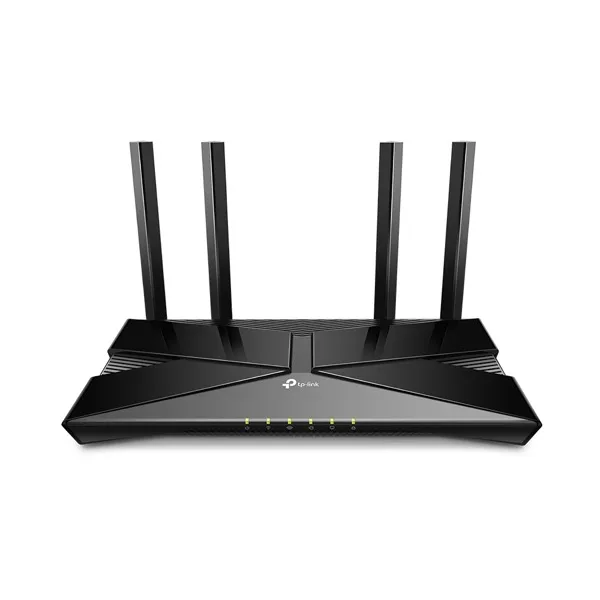
$149
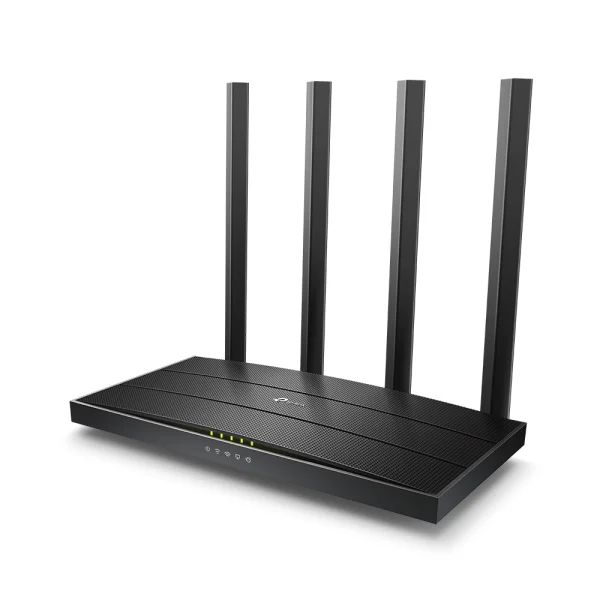
$99
No. The Vision Network is a separate, privately owned network. Like the nbn, it is a wholesale network: you buy your internet from a retail provider such as Quokka Net, not from the Vision Network itself.
Yes. The Vision Network is open to many retail providers, so you can choose the one that suits you. Check your address and we will confirm whether we can connect your place.
Use the address checker on this page. Vision builds into new housing estates and apartment buildings, so if you have moved into a new development there is a good chance you are on it.
No. The prices shown are our regular monthly prices for Vision Network plans, not introductory offers, so there is no discount period that ends and pushes your bill up.
Quokka Net charges $0 activation on Vision Network plans. Vision Network may charge a $300 new development fee if you are the first connection in a newly developed area, or the first connection in an established area where the number of premises has increased. If your address is classed as a subsequent install, there is a $299 new line fee. We will tell you about either fee before we go ahead.
It depends on your building. Where Vision uses the existing phone wiring, the Vision NTU connects to the DSL port on your router, so you need a modem router with a DSL port that supports VDSL2. Elsewhere, you can bring your own router as long as it has a WAN Ethernet port, supports PPPoE or IPoE (DHCP), and is not locked to a previous provider. If you would rather skip the setup, add a router from us when you sign up.
Not every Vision Network address can get every speed. The address checker shows the plans available at yours. Each plan lists its typical evening speed, which is the speed most customers can expect between 7pm and 11pm. Your actual speed also depends on your Wi-Fi, your devices and what you are connecting to. In buildings that use the existing phone wiring, speed also depends on the quality of that wiring.
Check for Vision Network outages and our service status, then try a few quick fixes at home. If it's still down, contact your provider: they raise the fault with the network for you.
No. Vision Network plans are month-to-month, so you can change speed or leave without an exit fee.
We'll help you through the whole move. Tell us your new address and move date, and we'll check what's available there and order a new service at your new place, ready for your move. If your new place is on a different network, you choose from the plans available there. If you're already with us, we'll close your old service once the new one is live, so you're not paying twice.
Totally normal. Vision builds its fibre into new housing estates and apartment buildings, so if you've moved into a new development there's a good chance you're on it. Pop your address into the checker and we'll tell you in about 20 seconds.
Not on Vision? No worries. We connect nbn and eight other networks, and our main address checker will show you every plan at your place.
Check your address is on Vision, pick a plan, and we'll take care of the rest.
*Where nbn VDSL is the technology. Speeds fluctuate depending on quality of in-building copper. Terms and conditions apply. Vision plans are available only at addresses served by the Vision Network.
†Not every Vision Network address can get every speed. The address checker shows the plans available at yours.