
If your nbn HFC service stops working properly, restarting or resetting the nbn connection box can fix it. This guide covers both nbn HFC boxes: the Arris CM8200 and the older Arris CM820.
The connection box belongs to nbn and holds no settings of yours, so a reset doesn’t change your Wi-Fi or router. It does take your internet offline for a few minutes. We don’t recommend doing it regularly.
Try a restart first
- Turn off the nbn box at the power point, and turn off your router.
- Wait a minute.
- Turn the nbn box back on, and wait until its lights settle (up to 10 minutes).
- Turn your router back on.
When the CM8200 is working, its Power and Online lights are solid green, and its Downstream and Upstream lights are solid green or solid blue. Blue is normal: it means the box is using several channels at once for higher speeds. Your router plugs into the UNI-D1 port on the back.
If that doesn’t fix it, try a reset.
Reset an Arris CM8200
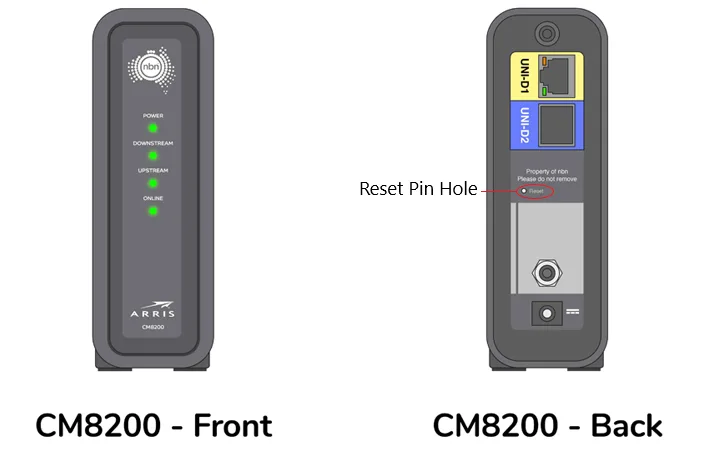
You’ll need a paperclip, or something similar, to press the button inside the reset pinhole.
- Leave the nbn box turned on.
- Find the reset pinhole on the back, below the UNI-D ports.
- Push the paperclip into the pinhole and hold the button for a full 60 seconds. If you let go too early, the box just restarts instead of resetting.
- Let go. The box restarts by itself. Wait up to 10 minutes for its lights to settle.
Reset an Arris CM820
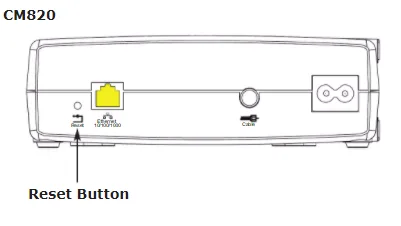
- Leave the nbn box turned on.
- Press and hold the Reset button for at least 15 seconds, using a paperclip if it’s recessed.
- Let go. The box restarts by itself.
- When the power light stops flashing, the reset is finished.
A reset returns the box’s settings to factory defaults. It doesn’t roll back the box’s software.
Still not working?
If any light is off or keeps flashing, or you still can’t get online, report a problem or call us on 1800 663 977. Tell us which lights are on, and that you’ve already reset the box. We’ll run tests on the line and raise a fault with nbn if needed.
For slow speeds rather than no connection, see improving slow internet speeds.